3 Reader
Reader builds a molecular model from the extractor’s files and displays structures and measurements through Qt and VTK. It stores an atom’s chemical identity separately from its coordinates and calculated values. The display and analysis tools use atom indices to connect these records.
This chapter describes the published Reader at revision 8714b8ca (10 September 2026). Appendix C identifies the source files behind the diagrams.
3.1 The same atom throughout
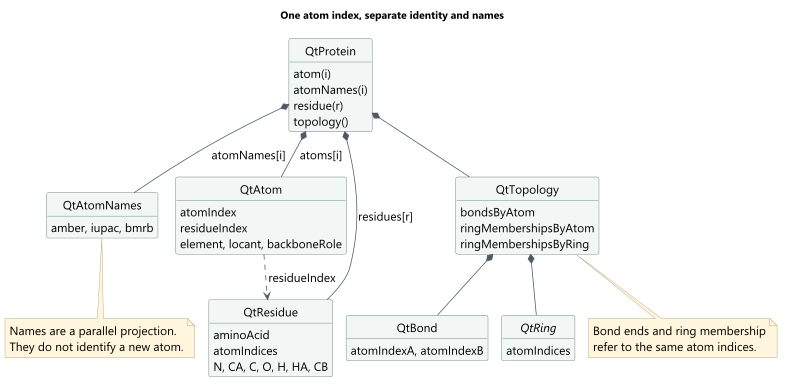
QtProtein holds the atoms, residues, names and topology for one loaded protein. Each QtAtom records chemical categories including element, locant, branch, backbone role and stereochemistry. It also stores the atom’s index and residue index. A parallel QtAtomNames array holds the names used for display labels.
QtResidue groups atom indices and retains direct indices for common backbone atoms. The loader builds these lists from the extractor’s topology records. QtTopology stores bonds and rings, plus lists of those containing each atom. Bond endpoints, residue members and selected atoms all use indices into the same atom array.
For atom index i, these expressions refer to the same atom:
protein.atom(i);                         // chemical identity
protein.atomNames(i);                    // names in supported conventions
conformation.atomPosition(frame, i);     // coordinates in a chosen frame
biotSavart.shielding(i);                 // a result in a selected snapshot
These calls use the index directly rather than searching by atom name. Reader retains names for reading files, labelling the display and writing output.
Code: QtProtein.h, QtAtom.h, QtResidue.h, QtTopology.h, QtTopologySidecar.cpp::PopulateBackboneCache, and the membership construction in QtTopologySidecar::Load.
3.2 Molecular identity and frame data
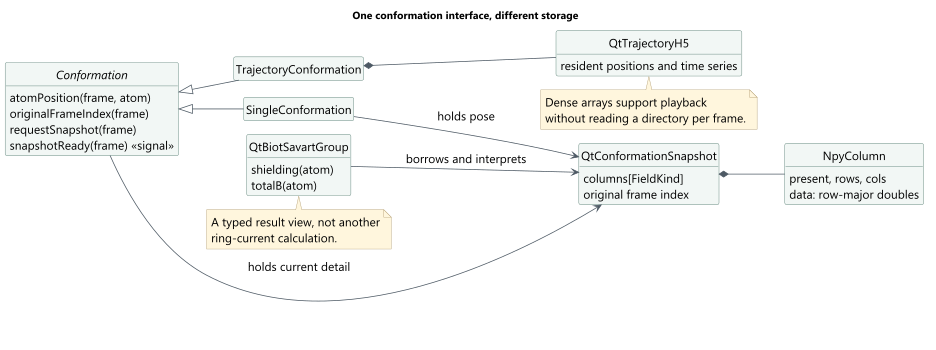
Conformation provides a common interface to frame counts, times, positions and detailed results. SingleConformation holds one pose snapshot. TrajectoryConformation owns QtTrajectoryH5, which keeps arrays of positions and available time-series measurements in memory. During playback, the scene reads those arrays through the conformation without reloading the per-frame NPY files at every animation step.
QtConformationSnapshot stores the detailed results for one frame. It holds an array of NpyColumn objects indexed by FieldKind. FrameNpyLoader maps filenames to field identifiers, loads the fields selected by Reader’s policy and fills the columns. Each column records its presence, shape and numerical values; the catalogue specifies whether its rows refer to atoms, residues or rings. Loaded columns are accessed by FieldKind, without searching filenames.
Typed accessors such as QtBiotSavartGroup read vectors, tensors and small result records from the snapshot’s columns. They refer to the snapshot without copying its arrays or rerunning the extractor’s calculations. For example, QtRingKernelGroup reads an atom’s nine stored values as one scalar, three rank-1 components and five rank-2 components. Its accessor returns an empty optional value if the required column is absent.
The base Conformation retains one current snapshot. requestSnapshot loads a requested snapshot synchronously on the object’s thread, then emits snapshotReady. The dashboard keeps its own samples for history plots rather than relying on that single snapshot.
Positions and frame numbers use the following indexing conventions:
The three coordinates of an atom in a stored frame begin at offset
(atom * frameCount + frame) * 3in the position array. AQtFrameholds a pointer to the conformation and the stored frame’s row number. It retrieves values through the conformation instead of owning another set of arrays.A trajectory row and an original frame number are different identifiers.
TrajectoryFrameMapmaps between them. The loader uses the original number to find the correspondingframe_NNNNNNNPY directory and records that number in the snapshot.
Code: Conformation.cpp, TrajectoryConformation.cpp, SingleConformation.cpp, QtTimeSeriesBuffers.h, FrameNpyLoader.cpp, QtConformationSnapshot.h, and QtRingKernelGroup.h.
3.3 The main window owns the loaded data
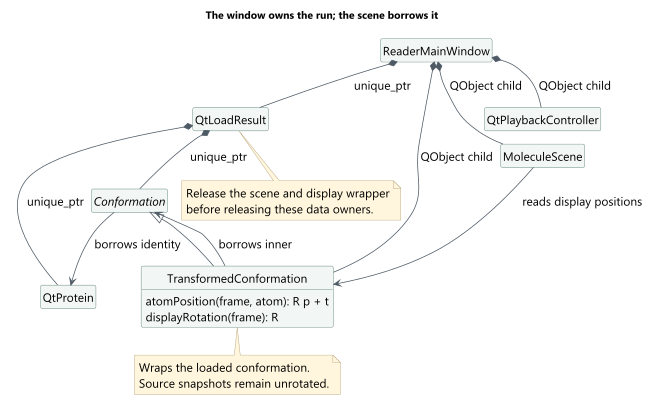
The extractor’s Protein owns its retained conformations. Reader’s loader instead returns a QtLoadResult that owns the QtProtein and Conformation separately. ReaderMainWindow owns that result and creates the display and control objects that use the loaded data. The conformation holds a non-owning pointer to QtProtein, through which it accesses chemical identity and topology.
QtProtein does not inherit from QObject. Conformation and the playback, selection and display controllers do. The diagrams distinguish ownership through unique_ptr or QObject parenting from borrowed pointers. Snapshots use shared_ptr<const QtConformationSnapshot>, which lets several readers retain the same snapshot without modifying it through those pointers.
Reader keeps its dock widgets when it replaces a loaded run. clearLoadedRun first disconnects the views from the old data. It then deletes the run’s scene and controllers before releasing the transformed conformation and the loaded data. This order prevents views from referring to objects that have already been destroyed.
Code: QtProteinLoader.h::QtLoadResult, ReaderMainWindow.cpp::installLoadedRun, and clearLoadedRun.
3.4 Display coordinates
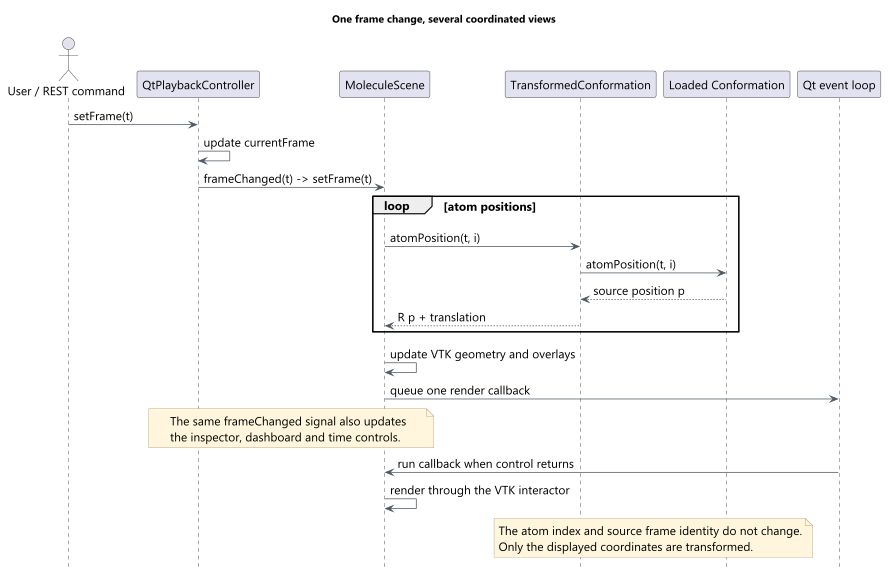
For display, TransformedConformation returns rotated and translated positions through the Conformation interface. It applies R * position + translation to positions while preserving atom indices and frame numbers. The wrapper returns the underlying snapshot with its stored vectors and tensors unchanged. Tensor display code obtains the rotation separately from the wrapper and applies it where required.
Code: TransformedConformation.cpp::atomPosition, displayRotation, and loadSnapshot.
3.5 Qt connects the views
QtPlaybackController stores the current frame number and emits frameChanged when it changes. The main window connects that signal to the scene, inspector, dashboard and time controls. The scene updates its geometry by reading positions through the conformation interface. If several render requests arrive before the next render, the scene queues only one Qt callback. The callback asks VTK to render after the current update has finished.
The scene and inspector share an AtomSelection object. This QAbstractListModel records the selected atom indices and the focused atom. To display a selected atom’s measurements, the inspector requests a snapshot from the conformation. When the conformation emits snapshotReady, the inspector reads the atom’s values through the typed result accessors.
The dashboard uses TrajectorySignalCatalog to list available measurements. Qt item models record the user’s choice of measurements and panels. DashboardDisplayController and the panel widgets retain sampled measurements for the history plots.
The REST interface is another way to operate the application. The /api/run/load route calls the main window’s loadRunPath function, and /frame/set requests a frame change through the playback controller. Both routes use the same functions as the interactive controls. Longer model-input exports use the loaded protein and conformation and proceed in steps queued through Qt’s event loop.
Code: ReaderMainWindow.cpp::installLoadedRun, QtPlaybackController.cpp, MoleculeScene.cpp::requestRender, QtAtomInspectorDock.cpp::setContext, AtomSelection.h, and RestServer.cpp.
3.6 The correspondence with the extractor
Design idea |
Extractor |
Reader |
|---|---|---|
| Stable molecular identity | Protein, Atom, Residue |
QtProtein, QtAtom, QtResidue |
| Find bonds and rings from an atom | Protein/covalent/ring topology objects | QtTopology with bonds, rings and reverse-index lists |
| Names are separate from chemical categories | Chemical categories and names in supported conventions | Typed atom fields and separate name arrays |
| Coordinates change; atom indices stay the same | ProteinConformation, ConformationAtom |
Conformation::atomPosition(frame, atom) |
| Access calculated measurements | Calculator results and result buffers | Catalogued columns and typed group views |
| Trajectory storage is separate from identity | Trajectory protein/atom buffers | QtTrajectoryH5 time series and QtFrame views |
Reader shares these design principles with the extractor, but builds its own molecular objects from the extracted files. Its display, export functions, optional inference helper and visualisation calculations all use the loaded data. It does not run the extractor’s calculator sequence or the Python training code.